Thursday, July 30, 2015

Project SSTC1 - Reviving my Tesla Coils and taking them further Southland Mini Maker Faire

I first saw instructions on building a Tesla Coil back in the early 1980's, in either Popular Science or Popular Electronics magazine, while at science camp over summer break during elementary school.  The design used a multiple gap spark gap (copper tubes inside a cylinder - which I now know is a Richard Quick Spark Gap) and capacitors made out of window panes and aluminum foil.  It looked Super Cool to me but the concepts were beyond my understanding and the idea of building it was a bit scary (I couldn't imagine who I could ask for help or even just address my questions),

The picture stuck in my mind - I just wanted to see one up close and in person. While on a road trip up the East Coast (early 90's) I saw a sign (it was somewhere either near or in Boston, MA) where they had some big coils that they used for a lightning display.  I remember going by the museum to find that the exhibit was closed.  Tesla Coils and man made lightning retreated in my mind.

Fast forward about 20 years - While working with my daughter on some basic electronics projects - make a simple electric motor using a magnet, magnet wire, a battery, paper clips and soda straws I thought why not make sparks!!!

I was really thinking about static electricity (I loved being able to shuffle across the carpet so I could reach out my finger to ZAP my brother or sister - they did the same to me of course).  So, I thought why not make a Van De Graff Generator.

After building a small one, that did work, just not very well I wanted a more impressive display.   A Tesla Coil seemed to be the answer, so I began my research (thinking it would only take a few weeks to build it). Well, it took a bit longer - more like 4 months research, trial and error, failures and finally success.


During my process of building the coil I was showing videos of Tesla Coils (on YouTube.com) to my daughter and we came across Tesla Coils that could play music.   That just seemed so amazing, I looked into how people were able to do it.  It appeared fairly complicated but I found something I might be able to do - an audio modulated Plasma Arc (or Plasma Speaker).  I did try building a basic Solid State Tesla Coil (Steve Wards Mini SSTC), but I just kept blowing MOSFET's and they were expensive and I had to get them by mail order.  So, I put the project on hold until I had more knowledge.

Now, I'm finally going for it and I thought exhibiting at the Southland Mini Maker Faire would be great motivation to finish it .  I re-built my half H-Bridge driver board (using my CNC to mill the board).  I connected everything up and it WORKED.


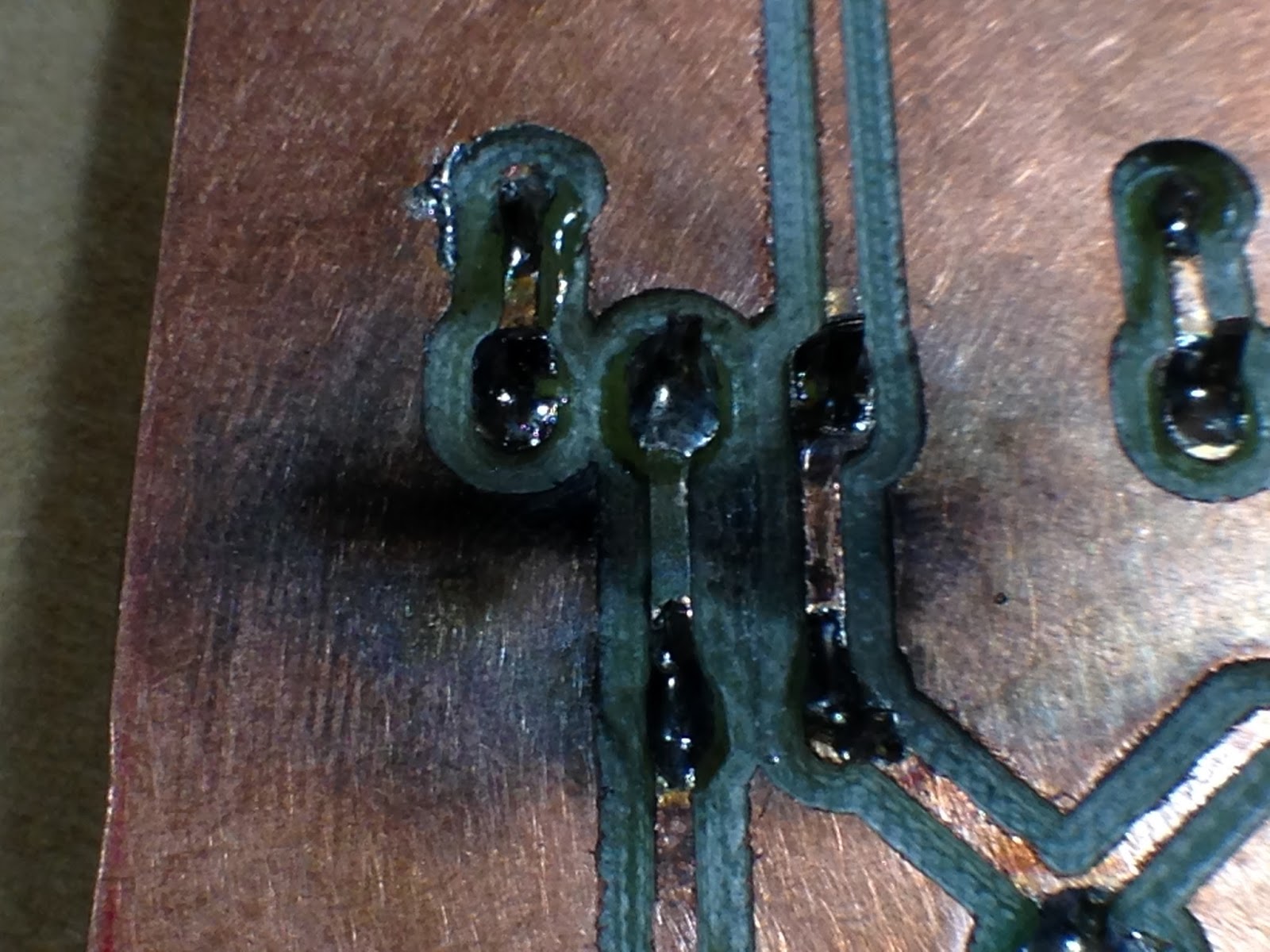
Well, for a few minutes at least and then a POP and some smoke.  The MOSFET's were quite hot and looking at my new board I saw...


Missing trace
A trace shorted and vaporized.  After desoldering all the components I determined that both MOSFET's were dead but all other components were fine.

I re-made the board on perfboard and added big heat sinks to the MOSFET's and a fan to help keep then cool.  No full test yet, ramping power up slower to make sure everything is OK.
New Half H-Bridge Board


Cut copper pads from around component connections to minimize arcing.

Monday, July 27, 2015

Chicago Southland Mini Maker Faire

I finally submitted my registration for the Chicago Southland Mini Maker Faire.
This year I'm building an audio Tesla Coil (or: audio modulated, singing Tesla Coil etc).  I've built a good number of Spark Gap Tesla Coils but my attempts at building a Solid State Tesla Coil seem to result in dead MOSFET's and magic blue smoke.

Thursday, June 25, 2015

My Hackaday Prize entry

Finally decided on a project for the Hackaday Prize.  It's been going around in my head for awhile so I already have an approach and done a bunch of research into the science for this idea.

You can check it out here Stripless-bG-Measurement for Diabetes management.

Project Edge Lit Sign - PART 2

The Electronics

This part of the project took me a bit longer than I expected.  I thought I had everything figured out for the design, parts and programming for the micro controller (Arduino Pro Micro) but ran into an unexpected issue that forced me to change course and use completely different hardware along with software libraries I hadn't used before.  Good news is that even with the changes and learning new hardware and software the new setup is actually easier and simpler to wire up and use.

My initial electronic design for controlling RGB LED's for the sign illumination.
Parts:
  • 5mm RGB Common Anode LED's 
  • TLC5940 shift registers 
  • Arduino (Nano on breadboard)
  • Resistors for setting current limit
I built up the circuit on a solder-less breadboard to get it working.  Below is the setup from the Arduino Playground.

Wiring for TLC5940
Pictures of the layout:

I transferred the circuit to perf board (laid out the same as solder-less breadboard), cut and drilled out a piece of wood to mount the LED's in my box and wired in a wall wort for power.

All the Parts
Perf Board (back side)
 
Wiring it all up
Software library, further instructions, etc can be found at:
  1. Direct link to Google Repository
  2. Arduino Playground page for TLC5940
 So, after all that work building and testing - it worked perfect but it just wasn't bright enough for the sign so I had to reboot and go a different route.

Decided to go with Neopixels - much brighter RGB LED's.  Individually addressable for color and brightness, much easier to wire up - just a 3 wire connection to Arduino (Trinket or clone).  Do need real basic power filter (1000uF 6.3v or higher electrolytic capacitor across power rail to filter out spikes) as well as current limit to data line (300 to 500 ohm resistor to keep current at set level).

Currently there are 2 very good libraries (that I know of) for controlling Neopixel's with an Arduino.  I provided links to them as well as guides to using them below.

FastLED
Adafruit Neopixel
I'll complete this post tomorrow (Part2b) with the final electronics and code.   

Wednesday, May 20, 2015

Project Edge Lit Sign - Trying Edge lit Sign Again, PART 1

Revisiting my Edge Lit Sign project.  I'm dividing this up into 3 segments due to the separate challenges that I encountered working through each part of this project.  This segment addresses just the engraving of the sign, other segments will address the electronics and mounting/housing.

Many, many people have made acrylic signs illuminated with LED's on the edge.  Adding illumination to the edge of the acrylic causes it to light up only in the areas that it has been cut or engraved. I've previously tried this using window glass engraved using diamond glass cutting bits – it didn't end up being very bright (turns out acrylic transmits light better than glass).

With my 3D Printer build last summer, I shelved this project until I had the time to come come back to it and that's what I'm finally doing.  Instead of etching glass, this time I'm trying it with acrylic that is custom made for edge lit signs (it is clear but has metal flakes embedded in the acrylic that reflect light when the acrylic is cut), you can find it over at Inventables.

I was inspired to do this sign project as a gift for my wife, she owns and runs a nut free bake shop (Callie's Cuties) and I wanted to make her a fun sign for inside her shop with her logo on it.  After getting a vector file of her logo, I opened it up in Inkscape (an open source vector editor).  I only changed a few parts of it to make it a little more friendly for engraving on my CNC (primarily different fonts).  When I finished my changes I selected the whole graphic and made certain to change it all to a Path (selected Object to Path in the Path drop down menu), then I flipped it to make it a mirror image and then rotated it on its side (to fit the dimensions of my CNC).

After working out the size and layout of the sign I made a cardboard mockup to better visualize what my goal was.
measuring and cutting out the cardboard

Reversed image to be engraved (should have used normal image)

Checking image against acrylic stock

Assembling the base

Finished base

Mockup Done!
After reviewing this with my wife, I needed to make a few changes - adding "Open" and "Bake Shop".  So, the orientation changed and the sign became 8" wide by 10" high instead of 9" wide and 8" wide.
 
On to my first hurdle, figuring out the feed rate and depth of cut took a bit of trial and error, I'm using a 1/16" single flute end mill by Kyocera (purchased from CarbidePlus).  Initially I thought I would need to cut fairly deep into the acrylic cut so my first try was cutting to 0.1" depth (almost 1/2 the thickness of the sheet) with a step down of 0.05" (so 2 passes to reach target depth).  First test at 30 in/min was much to fast, I lowered to 20 in/min - still to fast, and then to 10 in/min.  Now that I had a good speed I needed to adjust the cut depth for each pass, 0.1" was definitely to deep, it resulted in to much friction and the end mill getting clogged with melted acrylic.  In addition to that, I felt I was aiming much to deep for my target depth.  I decided on another trial at 8in/min, 0.01" target depth with step down of 0.005".  The first pass achieved the results I as looking for.

I changed the cutting parameters in MakerCAM, selecting the entire graphic and using the "follow path" on the CAM menu: tool size 0.0625", depth of cut 0.004", safe height 0.25", step down 0.004".  After saving the new G-Code file I placed a new piece of acrylic on the bed and ran the code through Universal G-Code Sender.  You can see my result below.

Milling the Reversed Image

The finished image (before cutting extra stock off)

I should note that in my impatience I wasted a sheet of custom acrylic but trying to cut first before determining optimum speeds and depth for my CNC.

Saturday, May 16, 2015

Project Theramin - Success... Finally!!!

 I've researched Theremin's quite a but over the past few years, in an effort to build my own.  Theremin's have a distinctive sound and I've always liked it even when I didn't know what instrument made the sound.

I recently completed a Theremin build,  I tried building this particular Theremin 3 times in the past (once on bread board and 2 times on perf board using the wire wrap method), I hayd temporary success on bread board and no success with wire wrap.  I set everything aside for about a year and focused on other projects.  As I got better at building and troubleshooting I came back to finally conquer this build.


This Theremin is based directly on Art Harrisons Minimum Theremin.

 I made a few, very minor, changes to the circuit:
  • Substituted an LM7805 voltage regulator for the one used in the circuit (the pin out is a bit different)
  • Added a power indicator LED
Instead of making this a straight sterile build I wanted to add a bit of style to it. My goal was to make it a bit like a Steampunk version.  As a result, I wanted it to look old and used while still looking fully functional.

Finished Theremin

Theremin Antenna
 It did take me awhile before deciding on the cord attachment to the antenna, after aremad bit of trial and error (and some research) I decided to use boot laces as a jacket for the connecting wire (looks similar to antique braided cloth wire jacketing).
Housing for Theremin
 The box I used to house this Theremin was a simple box from Micheal's craft store.  I removed all the hardware,  remade the front panel, added new "antiqued" brass plated hardware.  Also, sanded, primed, painted and polyurethaned all the outside surfaces. 
Theremin Circuit board

Antenna Connection

Rear of Box


Hooked up to Guitar Amp